Excellent. Chapter 6 is where you transition from infrastructure to database security administration. This chapter should establish security best practices because every subsequent chapter (roles, privileges, auditing, HDI containers, etc.) depends on proper user administration.
Chapter Objectives
After completing this chapter, you will be able to:
- Understand SAP HANA Cloud authentication concepts.
- Create and manage database users.
- Differentiate between user types.
- Configure password policies.
- Lock, unlock, and reset user accounts.
- Monitor user activity.
- Manage user lifecycle.
- Apply security best practices using least-privilege principles.
6.1 Introduction
User administration is one of the most critical responsibilities of a SAP HANA Cloud administrator. Every database connection is associated with a database user, and the security of the database depends on proper identity management and authorization design.
Unlike SAP BTP users, SAP HANA Cloud database users exist inside the database and are managed separately.
Understanding the distinction between SAP BTP identity management and SAP HANA Cloud database users is essential.
6.2 SAP BTP Users vs. SAP HANA Database Users
One of the most common areas of confusion is the separation between platform identities and database identities.
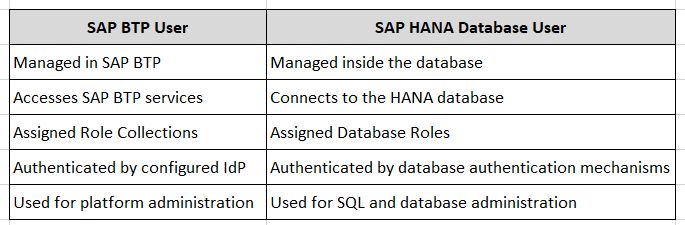
⚠ Important
Creating a SAP BTP user does not automatically create a SAP HANA database user.
6.3 User Types
SAP HANA Cloud supports different user types.
Database Users
Most administrators and applications use database users.
Characteristics:
- Password-based authentication
- SQL access
- Role assignment
- Schema ownership
- Object privileges
Technical Users
Technical users are intended for:
- Interfaces
- Scheduled jobs
- Applications
- Integration scenarios
Best practices:
- Non-interactive usage
- Dedicated purpose
- Minimal privileges
- Credential rotation
Personal Administrative Users
Every administrator should have an individual account.
Example:
AHMED_ADMIN
instead of
DBADMIN
Advantages:
- Accountability
- Auditability
- Easier privilege management
- Individual password policies
⚠ Best Practice
Avoid sharing administrator accounts.
6.4 Creating a Database User
Users can be created using SQL or administration tools such as SAP HANA Database Explorer.
Using SQL
CREATE USER BASIS_ADMIN
PASSWORD "InitialPassword#2026"
NO FORCE_FIRST_PASSWORD_CHANGE;
Explanation
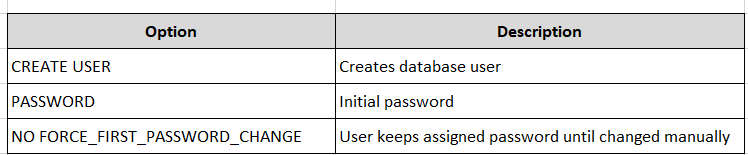
Do not use weak passwords.
6.5 Force Password Change
To require a password change at first login:
CREATE USER BASIS_ADMIN
PASSWORD "InitialPassword#2026"
FORCE_FIRST_PASSWORD_CHANGE;
This is recommended for manually assigned passwords.
6.6 Alter User Password
Reset a password:
ALTER USER BASIS_ADMIN
PASSWORD "NewPassword#2026";
⚠ Best Practice
Reset passwords instead of deleting and recreating users to preserve object ownership and audit history.
6.7 Locking a User
To prevent login:
ALTER USER BASIS_ADMIN
DEACTIVATE USER NOW;
Typical scenarios:
- Employee leaves company
- Security incident
- Temporary suspension
6.8 Unlocking a User
To reactivate:
ALTER USER BASIS_ADMIN
ACTIVATE USER NOW;
6.9 Dropping a User
Remove a user:
DROP USER BASIS_ADMIN;
⚠ Warning
Before dropping a user:
- Check schema ownership
- Check object ownership
- Transfer owned objects if required
- Review dependent privileges
Deleting a user without reviewing ownership can impact applications.
6.10 Viewing Existing Users
List users:
SELECT USER_NAME,
       USER_DEACTIVATED,
       LAST_SUCCESSFUL_CONNECT
FROM SYS.USERS
ORDER BY USER_NAME;
Useful information:
- Username
- Account status
- Last successful login
6.11 Viewing Connected Users
SELECT CONNECTION_ID,
       USER_NAME,
       CLIENT_HOST,
       APPLICATION_NAME
FROM SYS.M_CONNECTIONS;
Useful for:
- Security reviews
- Troubleshooting
- Session monitoring
6.12 Password Policy
Password policies help enforce organizational security standards.
Review the current policy:
SELECT *
FROM SYS.PASSWORD_POLICY;
Depending on your SAP HANA Cloud configuration, administrators can review password-related settings exposed by the service. Some parameters are managed by SAP and may not be directly configurable by customers.
Typical policy considerations:
- Minimum password length
- Password complexity
- Password lifetime
- Failed login attempts
- Password history
⚠ Note: Available configuration options may differ from on-premise SAP HANA because SAP HANA Cloud is a managed service.
6.13 User Monitoring
Monitor login history:
SELECT USER_NAME,
       LAST_SUCCESSFUL_CONNECT,
       LAST_INVALID_CONNECT_ATTEMPT
FROM SYS.USERS;
Review regularly to identify:
- Dormant accounts
- Repeated failed logins
- Unused technical users
6.14 User Lifecycle Management
A recommended lifecycle:
Request
   │
Approval
   │
Create User
   │
Assign Roles
   │
Periodic Review
   │
Modify Access
   │
Deactivate
   │
Delete (if appropriate)
6.15 Least-Privilege Design
Instead of assigning powerful system privileges directly to users:
Recommended
User
   │
Database Role
   │
Privileges
Avoid:
User
   │
Direct Privileges
Benefits:
- Easier administration
- Improved auditing
- Simplified access reviews
- Reduced security risk
6.16 Naming Standards
Example naming convention:
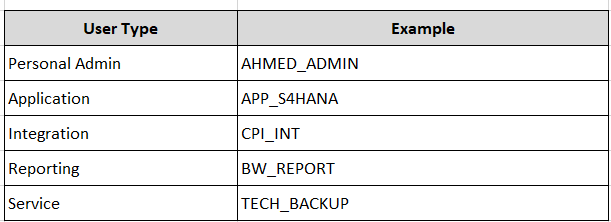
Consistent naming simplifies administration and audits.
6.17 Common User Administration Issues
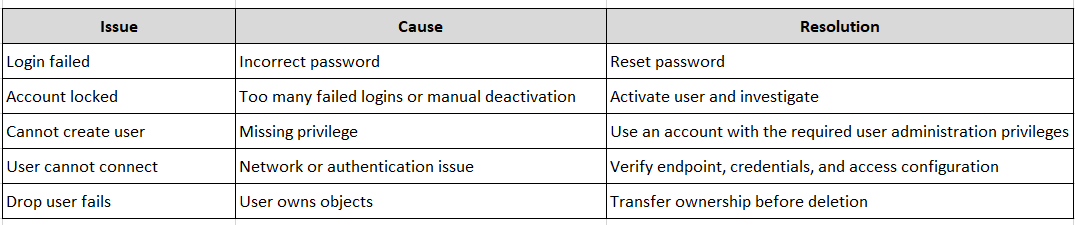
Best Practices
- Create personal administrator accounts.
- Avoid using the initial administrative account for daily work.
- Use strong password policies.
- Assign privileges through roles, not directly.
- Periodically review inactive users.
- Remove unused technical accounts.
- Document all administrative users.
- Review user access as part of regular governance processes.
Chapter Summary
This chapter introduced user administration in SAP HANA Cloud, including user creation, password management, account activation and deactivation, monitoring, lifecycle management, and security best practices. It also clarified the distinction between SAP BTP identities and SAP HANA database users and emphasized the importance of least-privilege administration.
Hands-On Exercise
- Connect to your SAP HANA Cloud database using SAP HANA Database Explorer.
- Create a test user:
CREATE USER TEST_ADMIN
PASSWORD "Welcome#2026"
FORCE_FIRST_PASSWORD_CHANGE;
- Verify the user exists:
SELECT USER_NAME
FROM SYS.USERS
WHERE USER_NAME = 'TEST_ADMIN';
- Deactivate the user:
ALTER USER TEST_ADMIN DEACTIVATE USER NOW;
- Reactivate the user:
ALTER USER TEST_ADMIN ACTIVATE USER NOW;
- Remove the test user:
DROP USER TEST_ADMIN;
Knowledge Check
- What is the difference between a SAP BTP user and a SAP HANA database user?
- Why should administrators use named personal accounts instead of shared accounts?
- Which SQL statement creates a new database user?
- What should you verify before dropping a user?
- Why is assigning privileges through roles considered a best practice?
- Which system view can be used to review existing users and their login information?
Next Chapter
The next chapter will provide an in-depth exploration of:
- System privileges
- Object privileges
- Analytic privileges
- Repository and HDI-related roles
- Standard SAP roles
- Custom role design
- Least-privilege implementation
- Creating a secure DBA role for day-to-day administration
This chapter is one of the most important in the book, as it forms the foundation for secure SAP HANA Cloud administration.
Follow me to catch the full series as it drops. Each article builds on the last.
#SAPAI #SAP #ArtificialIntelligence #MachineLearning #GenerativeAI #SAPConsultant #BusinessAI #Joule #SAPJoule #EnterpriseAI #S4HANA #SAPS4HANA #SuccessFactors #DigitalTransformation #SAPBTP #CAPM #SAPDeveloper #GenerativeAIHub #SAPAICore #MultiModel #GPT4 #Claude #Gemini #SAPBTPAI #ModelSelection #AIForBeginners #NoVendorLockIn #SAPCloud #CloudApplicationProgrammingModel #SAPTraining #SAPCareer #ABAP #SAPHANA #CloudComputing #EnterpriseApplications #TechSkills #CareerGrowth #Upskilling #JouleAgents #AgenticAI #SAPBuild #SAPIntegrationSuite #AutonomousEnterprise #FutureOfWork #BusinessTechnologyPlatform #SAPCommunity #Innovation #SAPSD #AIAgents #ERP #LearningInPublic #S4HANAPublicCloud #SAPPublicCloud #SAPLicensing #SAPCloudERP #CloudERP #BusinessTransformation #ITStrategy #EnterpriseArchitecture #SAPConsulting #SubscriptionModel #CloudMigration #TechnologyLeadership #CIO #EnterpriseTechnology #DigitalEnterprise #SAPLearning #SAPExperts #ERPTransformation #FutureOfERP #SAPCloudALM #ALMSummit2026 #SolutionManager #ApplicationLifecycleManagement #SAPAI #Joule #EnterpriseAI #S4HANA #AIAgents #SAPSecurity #BusinessAI #DigitalTransformation #SAPConsulting #Anthropic #SAP #SAPHANA #SAPHANACloud #SAPBTP #SAPBasis #CloudComputing #DatabaseAdministration #SAPTechnology #CloudArchitecture #DigitalTransformation