Moving SAP workloads to AWS, Azure, or other cloud platforms does not remove BASIS problems.
It changes where those problems occur.
A production issue that looks like an SAP problem may actually originate from the cloud network, storage layer, operating system, database, DNS, load balancer, or security configuration.
For SAP BASIS teams, the ability to troubleshoot across these layers is becoming increasingly important.
Here are 15 common SAP BASIS issues in cloud environments, along with practical troubleshooting steps.
1. SAP System Is Slow After Cloud Migration
Typical symptoms
- Transactions take longer than before migration
- SAP GUI response time increases
- Batch jobs run longer
- Users report intermittent slowness
- HANA response time increases
Troubleshooting
Start from the SAP layer and work downward:
SAP
- Check ST03N for response-time analysis
- Check SM50/SM66 for work-process utilization
- Review expensive SQL statements
- Check SM37 for long-running jobs
HANA
- Review CPU and memory consumption
- Check expensive statements
- Check data volume growth
- Analyze disk I/O and latency
OS/Cloud
- Check CPU and memory
- Check disk throughput and IOPS
- Check network latency
- Check VM sizing
Key lesson
Do not assume:
“SAP is slow, therefore SAP is the problem.”
The bottleneck may be underneath SAP.
2. High Network Latency Between SAP and Database
SAP application servers and databases require reliable, low-latency connectivity.
This becomes particularly important when components are distributed across cloud availability zones, regions, or network segments.
Symptoms
- Slow transactions
- RFC timeouts
- Database connection errors
- Long-running dialog work processes
- Intermittent application failures
Troubleshooting
Check:
- Application server → database latency
- Packet loss
- Routing
- Security groups/firewall rules
- Network ACLs
- DNS resolution
- Load balancer configuration
At OS level, use appropriate network diagnostic tools such as:
ping
traceroute / tracepath
nslookup / dig
ss / netstat
For deeper investigation, use cloud-native network monitoring and flow logs.
Key lesson
For SAP, network latency matters even when bandwidth looks sufficient.
3. SAP HANA Storage Performance Problems
One of the most overlooked cloud issues is storage configuration.
A VM can have plenty of CPU and RAM but still suffer from poor performance because the underlying storage cannot deliver sufficient throughput or IOPS.
Symptoms
- High database response time
- Slow save operations
- Long-running SQL
- Backup performance degradation
- HANA alerts related to storage
Troubleshooting
Check:
- Disk latency
- IOPS
- Throughput
- Storage type
- Volume configuration
- Data/log volume performance
- Filesystem utilization
Compare actual workload requirements against the cloud storage configuration.
Key lesson
Storage capacity and storage performance are two different things.
4. SAP Application Server Cannot Connect to Database
This is one of the classic BASIS problems—but in cloud environments there are more potential failure points.
Troubleshooting sequence
Check:
1. DNS
Can the application server resolve the database hostname?
2. Network
Can the application server reach the required database port?
3. Firewall
Check cloud security rules and OS firewall.
4. Database
Confirm the database service is running and listening.
5. SAP configuration
Review relevant SAP profiles and database connectivity configuration.
6. OS
Check active connections and listening ports.
Useful checks
sapcontrol
ss
netstat
nslookup
telnet / nc
The objective is to identify exactly which layer is failing instead of repeatedly restarting SAP.
5. SAP Instance Does Not Start After VM Restart
Cloud infrastructure can introduce dependencies that are easy to miss.
After a VM restart, SAP may fail to start because:
- Filesystem is not mounted
- Network interface is unavailable
- DNS is not resolving
- Database is not available
- Shared storage is unavailable
- Permissions changed
- Cluster resources did not start
Troubleshooting
Check in this order:
VM
 ↓
OS
 ↓
Filesystem
 ↓
Network
 ↓
Database
 ↓
SAP services
Review:
df -h
mount
systemctl status
journalctl
sapcontrol
Key lesson
Do not immediately run SAP startup commands.
First establish whether the underlying operating system and dependencies are healthy.
6. ASCS/ERS High Availability Problems
SAP Central Services are critical components in an HA architecture.
A poorly designed HA configuration can create:
- ASCS failover problems
- Enqueue issues
- ERS synchronization problems
- Virtual hostname problems
- Cluster resource failures
Troubleshooting
Check:
- Cluster status
- ASCS resource
- ERS resource
- Enqueue replication
- Virtual IP/hostname
- Shared filesystem
- Fencing configuration
- Network connectivity
Also verify that the cloud architecture actually supports the selected HA design.
Key lesson
High availability is not simply:
“Two servers instead of one.”
It is an integrated architecture involving SAP, OS, cluster, network, storage, and cloud infrastructure.
7. SAP HANA Database Does Not Fail Over Correctly
Database HA requires more than database replication.
The entire application architecture must understand what happens during a failure.
Troubleshooting
Check:
- Replication status
- Primary/secondary roles
- Network connectivity
- Synchronization state
- Cluster resources
- Virtual hostname/IP
- Application server reconnect behavior
Verify that failover procedures are tested rather than assumed to work.
Key question
What happens to SAP when the primary HANA database disappears?
If the answer is unclear, the HA design is incomplete.
8. Backup Jobs Are Successful but Restore Fails
A green backup status does not necessarily mean you have a recoverable SAP system.
Common causes
- Incorrect backup retention
- Missing backup files
- Permission issues
- Incomplete log backups
- Storage connectivity problems
- Encryption/key problems
- Incorrect recovery procedure
Troubleshooting
Regularly perform:
- Backup validation
- Restore testing
- Database recovery testing
- Filesystem recovery testing
- Application validation
Measure the actual recovery time.
Key lesson
Backup success is not the same as disaster recovery readiness.
9. SAP File Systems Are Filling Up
Cloud environments make it easy to provision storage, but that can create a false sense of security.
Common problem areas include:
- /usr/sap
- /sapmnt
- HANA data volumes
- HANA log volumes
- Trace directories
- Backup directories
- Interface directories
Troubleshooting
Start with:
df -h
df -i
du -xhd1
Then identify the growth source.
For SAP specifically, investigate:
- Old trace files
- Application logs
- Job logs
- Interface files
- Core dumps
- Backup files
- Temporary files
Important
Do not blindly delete files from SAP directories.
Determine whether the file is managed by SAP, the OS, a backup process, or an interface.
10. SAP RFC / Interface Connections Fail
Cloud migration frequently exposes interface problems.
Symptoms
- RFC connection failures
- HTTP/HTTPS errors
- IDoc failures
- Timeouts
- External API failures
- Integration jobs stuck
Troubleshooting
Check:
SAP layer
- SM59
- SM58
- SMQ1 / SMQ2
- WE02 / WE05
- Application logs
Network layer
- DNS
- Firewall
- Routing
- Proxy
- Load balancer
Security
- Certificates
- TLS configuration
- Authentication
- Credentials
Key lesson
An RFC failure does not automatically mean the RFC configuration is wrong.
The external endpoint may simply be unreachable.
11. SAP SSL/TLS Certificate Problems
Certificates become especially important when SAP systems communicate with:
- Cloud services
- APIs
- Identity providers
- Monitoring platforms
- External applications
Symptoms
- HTTPS connection failure
- SSL handshake error
- Certificate expired
- Certificate chain error
- Authentication failure
Troubleshooting
Check:
- Certificate expiration
- Subject/SAN
- Certificate chain
- Trusted CA
- SAP PSE configuration
- TLS version
- Server-side certificate
For SAP environments, review the appropriate PSE and certificate configuration using SAP transaction STRUST.
Preventive measure
Do not wait for users to report:
“The interface stopped working.”
Implement certificate-expiration monitoring.
12. SAP Users Cannot Connect Through SAP GUI
Cloud network security can introduce new access restrictions.
Possible causes
- Firewall rules
- Security groups
- VPN problems
- Bastion/jump-host issues
- DNS
- Load balancer configuration
- SAP message server connectivity
- Incorrect routing
Troubleshooting
Separate the problem into:
Client
 ↓
Network/VPN
 ↓
Cloud firewall
 ↓
Load balancer
 ↓
SAP Message Server
 ↓
Application Server
Determine exactly where the connection stops.
Key lesson
“Users cannot log in” is a symptom—not a root cause.
13. SAP Batch Jobs Are Running Slowly
Cloud migrations can expose differences in:
- CPU performance
- Storage throughput
- Database performance
- Network latency
- VM sizing
Troubleshooting
Use:
SM37
- Job runtime
- Start delay
- Processing time
- Job status
ST03N
- Workload analysis
ST12 / SQL analysis
- Identify expensive processing where appropriate
HANA
- SQL performance
- CPU
- Memory
- Disk I/O
Cloud
- CPU utilization
- Storage latency
- Network performance
Compare the same workload before and after migration.
Key lesson
Benchmark workloads, not just infrastructure specifications.
14. Monitoring Does Not Detect the Real Problem
A common cloud SAP architecture can have several monitoring layers:
SAP Monitoring
      ↓
OS Monitoring
      ↓
Database Monitoring
      ↓
Cloud Monitoring
      ↓
Network Monitoring
The problem is that these tools may operate independently.
Example
SAP users report slow transactions.
SAP monitoring shows increased response time.
Cloud monitoring shows:
CPU = 40%
So everyone assumes infrastructure is healthy.
But storage latency has increased significantly.
Solution
Build monitoring around the complete SAP service rather than individual infrastructure components.
Monitor:
- SAP availability
- Work processes
- HANA health
- CPU
- Memory
- Storage
- Network
- Filesystems
- Backups
- Certificates
- Interfaces
- HA/DR status
15. Cloud Costs Increase Unexpectedly
This is a newer responsibility for many BASIS teams.
An SAP landscape may contain:
- Production
- QA
- Development
- Sandbox
- DR
- Training
- Temporary project systems
Leaving infrastructure running unnecessarily can generate substantial cloud costs.
Troubleshooting
Analyze:
- VM utilization
- Storage consumption
- Snapshot retention
- Backup retention
- Idle systems
- Non-production schedules
- Oversized instances
- Unused resources
Look for systems that have been provisioned for a project but never decommissioned.
Key lesson
Cloud optimization should be based on actual SAP workload requirements, not simply reducing infrastructure size.
A Practical SAP BASIS Cloud Troubleshooting Model
When troubleshooting an SAP problem in the cloud, avoid jumping directly into SAP transactions.
Use a layered approach:
        BUSINESS
           │
        SAP APP
           │
        DATABASE
           │
        OPERATING SYSTEM
           │
        STORAGE
           │
        NETWORK
           │
      CLOUD PLATFORM
           │
     PHYSICAL REGION
Ask:
1. Is the SAP service available?
2. Is the database healthy?
3. Is the OS healthy?
4. Is storage performing correctly?
5. Is network connectivity healthy?
6. Is the cloud infrastructure healthy?
7. Did anything change recently?
That last question is often underestimated.
A configuration change, cloud maintenance event, security-policy modification, certificate renewal, storage change, or OS patch can explain an issue that appears to be an SAP problem.
The Most Important BASIS Skill in Cloud
Cloud SAP troubleshooting is becoming less about knowing hundreds of transactions and more about understanding relationships between layers.
A modern BASIS engineer should be comfortable moving between:
SAP → HANA → Linux → Network → Storage → Security → Cloud → Automation
The strongest troubleshooting approach is not:
“Which SAP transaction should I check?”
It is:
“Which layer is actually failing?”
Once you identify the failing layer, the troubleshooting path becomes much clearer.
SAP BASIS Cloud Troubleshooting Cheat Sheet
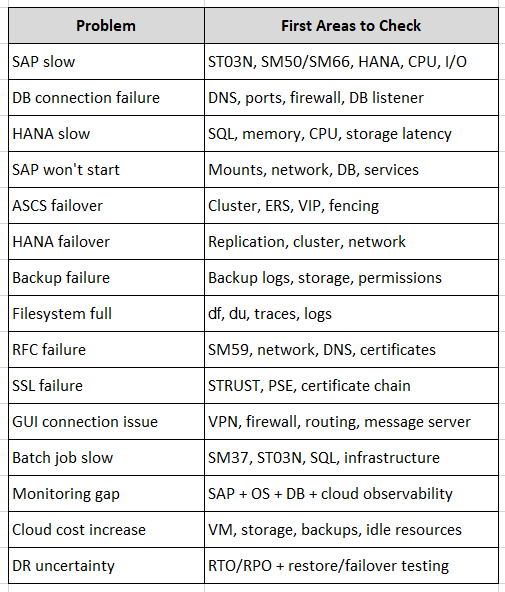
Closing remark
The future of SAP BASIS is not simply “BASIS in the cloud.”
It is cloud infrastructure knowledge combined with deep SAP operational expertise.
The BASIS engineer who can identify whether a problem originates in:
SAP configuration → HANA → Linux → storage → network → security → cloud infrastructure
will be far more effective than someone who only knows how to restart an SAP instance.
Cloud has not removed the need for BASIS.
It has raised the technical bar.
Which SAP BASIS cloud issue has caused the most troubleshooting effort in your environment: networking, HANA performance, storage, HA/DR, security, or backups?
Follow me to catch the full series as it drops. Each article builds on the last.
#SAPAI #SAP #ArtificialIntelligence #MachineLearning #GenerativeAI #SAPConsultant #BusinessAI #Joule #SAPJoule #EnterpriseAI #S4HANA #SAPS4HANA #SuccessFactors #DigitalTransformation #SAPBTP #CAPM #SAPDeveloper #GenerativeAIHub #SAPAICore #MultiModel #GPT4 #Claude #Gemini #SAPBTPAI #ModelSelection #AIForBeginners #NoVendorLockIn #SAPCloud #CloudApplicationProgrammingModel #SAPTraining #SAPCareer #ABAP #SAPHANA #CloudComputing #EnterpriseApplications #TechSkills #CareerGrowth #Upskilling #JouleAgents #AgenticAI #SAPBuild #SAPIntegrationSuite #AutonomousEnterprise #FutureOfWork #BusinessTechnologyPlatform #SAPCommunity #Innovation #SAPSD #AIAgents #ERP #LearningInPublic #S4HANAPublicCloud #SAPPublicCloud #SAPLicensing #SAPCloudERP #CloudERP #BusinessTransformation #ITStrategy #EnterpriseArchitecture #SAPConsulting #SubscriptionModel #CloudMigration #TechnologyLeadership #CIO #EnterpriseTechnology #DigitalEnterprise #SAPLearning #SAPExperts #ERPTransformation #FutureOfERP #SAPCloudALM #ALMSummit2026 #SolutionManager #ApplicationLifecycleManagement #SAPAI #Joule #EnterpriseAI #S4HANA #AIAgents #SAPSecurity #BusinessAI #DigitalTransformation #SAPConsulting #Anthropic #SAP #SAPHANA #SAPHANACloud #SAPBTP #SAPBasis #CloudComputing #DatabaseAdministration #SAPTechnology #CloudArchitecture #DigitalTransformation #SAP #SAPBASIS #S4HANA #SAPCloud #CloudComputing #AWS #Azure #SAPHANA #DevOps #Automation #CloudMigration #SAPCommunity #SAP #SAPBASIS #S4HANA #SAPHANA #SAPCloud #AWS #Azure #CloudComputing #SAPMigration #SAPInfrastructure #CloudMigration #SAPCommunity #DevOps #SAPJobs