Chapter Objectives
After completing this chapter, you will be able to:
- Understand the available connectivity options for SAP HANA Cloud.
- Locate and verify the SQL endpoint.
- Configure network access for client connectivity.
- Connect using SAP HANA Database Explorer.
- Connect using SAP HANA Database Client (JDBC/ODBC).
- Configure secure TLS connections.
- Create and manage database connections.
- Execute administrative SQL statements.
- Troubleshoot common connection problems.
5.1 Introduction
Once a SAP HANA Cloud database has been provisioned, the next step is establishing secure connectivity.
Unlike SAP HANA on-premise, where administrators typically connect directly to a database host, SAP HANA Cloud uses managed SQL endpoints secured through TLS and integrated with SAP BTP networking and identity services.
A successful connection requires:
- A running database instance
- SQL endpoint availability
- Appropriate network access
- Valid database credentials
- Supported client software
5.2 Connectivity Architecture
The following diagram illustrates the logical connectivity model.
+-----------------------------+
| Client Applications         |
|-----------------------------|
| SAP HANA Database Explorer  |
| SAP HANA Database Client    |
| DBeaver                     |
| Eclipse                     |
| JDBC / ODBC Applications    |
+-------------+---------------+
              |
        TLS Encrypted SQL
              |
+-------------v---------------+
| SQL Endpoint                |
| SAP HANA Cloud              |
+-------------+---------------+
              |
+-------------v---------------+
| SAP HANA Cloud Database     |
+-----------------------------+
All SQL communication is encrypted using TLS.
5.3 Connection Methods
SAP HANA Cloud supports several client options.
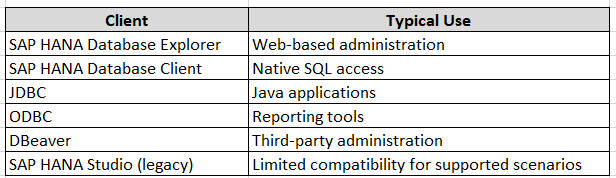
Note: SAP’s strategic direction favors SAP HANA Database Explorer and modern development tools over SAP HANA Studio.
5.4 Using SAP HANA Database Explorer
SAP HANA Database Explorer is the primary browser-based administration tool.
It provides:
- SQL Console
- Catalog Browser
- User Management
- Schema Management
- Data Preview
- Table Browser
- Import and Export
- Performance Analysis
Navigation
SAP BTP Cockpit → Subaccount → SAP HANA Cloud → Open in SAP HANA Cloud Central → Database Instance → Open Database Explorer
First Connection
Select:
Add Database
Provide:

Click Connect.
If successful, the database appears in the Explorer panel.
5.5 Understanding the SQL Endpoint
Each HANA Cloud database has a dedicated SQL endpoint.
The endpoint contains:
- Host name
- SQL port
- TLS configuration
Navigation
SAP HANA Cloud Central → Database Instance → Overview
Typical information displayed:
- Host
- SQL Endpoint
- SQL Port
- Status
⚠ Best Practice: Use the endpoint provided by HANA Cloud Central. Avoid hardcoding connection information into scripts or applications.
5.6 Verifying Database Status
Before connecting, confirm that the database is running.
Navigation
SAP HANA Cloud Central → Database Instance
Status values include:
- Running
- Starting
- Stopping
- Stopped
- Maintenance
Only a Running database accepts client connections.
5.7 Connecting with SAP HANA Database Client
The SAP HANA Database Client supports JDBC, ODBC, and command-line utilities.
Typical connection parameters:
ParameterExampleHost<SQL Endpoint>Port<SQL Port>UserDBADMINPassword********
Example JDBC URL:
jdbc:sap://<host>:<port>
⚠ Replace <host> and <port> with the values shown in SAP HANA Cloud Central.
5.8 First Administrative SQL
Open a SQL Console in Database Explorer and execute:
SELECT CURRENT_USER,
       CURRENT_SCHEMA,
       CURRENT_TIMESTAMP
FROM DUMMY;
Expected output:
CURRENT_USERCURRENT_SCHEMACURRENT_TIMESTAMPDBADMINSYSTEMCurrent timestamp
5.9 Verify Database Information
Retrieve database details:
SELECT DATABASE_NAME,
       VERSION,
       START_TIME
FROM SYS.M_DATABASE;
This confirms:
- Database name
- Version
- Startup time
5.10 List Active Connections
SELECT CONNECTION_ID,
       USER_NAME,
       CLIENT_HOST,
       APPLICATION_NAME
FROM SYS.M_CONNECTIONS
ORDER BY CONNECTION_ID;
Useful for:
- Troubleshooting
- Auditing
- Monitoring connected users
5.11 Verify Services
SELECT SERVICE_NAME,
       HOST,
       ACTIVE_STATUS
FROM SYS.M_SERVICES;
This query displays active database services.
5.12 View Memory Information
SELECT HOST,
       USED_PHYSICAL_MEMORY,
       ALLOCATION_LIMIT
FROM SYS.M_SERVICE_MEMORY;
Administrators should periodically monitor memory utilization to establish operational baselines.
5.13 Network Security
SAP HANA Cloud protects database connectivity through:
- TLS encryption
- SQL endpoint management
- IP allow lists (when configured)
- Private connectivity options
- SAP BTP networking services
⚠ Common Mistake
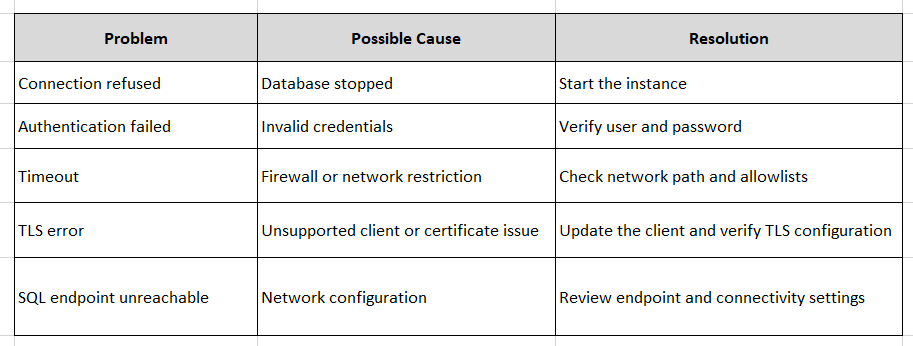
If credentials are correct but the connection fails, verify:
- SQL endpoint
- Database status
- Network access configuration
- Firewall rules
- IP allowlists
5.14 Common Connection Problems
5.15 Best Practices
- Use SAP HANA Database Explorer for routine administration.
- Create named administrator accounts instead of sharing the initial administrator.
- Store connection details securely.
- Enable only the required network access.
- Monitor active connections regularly.
- Use encrypted connections for all client access.
Chapter Summary
In this chapter, you learned how to establish secure connectivity to SAP HANA Cloud using SAP HANA Database Explorer and the SAP HANA Database Client. You explored the SQL endpoint, verified database status, executed your first administrative SQL statements, and reviewed common connection issues and security considerations.
Knowledge Check
- Which tool is SAP’s recommended browser-based administration interface for SAP HANA Cloud?
- Where can you find the SQL endpoint for a database instance?
- Why must the database be in the Running state before clients can connect?
- Which system view lists active client connections?
- What are the common causes of connection failures?
- Why is TLS required for SAP HANA Cloud connections?
Hands-On Exercise
- Connect to your SAP HANA Cloud database using SAP HANA Database Explorer.
- Verify the database is in the Running state.
- Execute the following SQL statements: SELECT CURRENT_USER, CURRENT_SCHEMA, CURRENT_TIMESTAMP FROM DUMMY; SELECT DATABASE_NAME, VERSION, START_TIME FROM SYS.M_DATABASE; SELECT CONNECTION_ID, USER_NAME, CLIENT_HOST FROM SYS.M_CONNECTIONS;
- Record the SQL endpoint, database version, and current connection information for your environment.
Next Chapter
In the next chapter, we will cover:
- Database user types
- Creating and managing users
- Password policies
- User lifecycle management
- User groups
- Account locking and unlocking
- SQL examples for administration
- Security best practices using least-privilege principles
This chapter will establish the foundation for secure access management before moving on to roles and authorizations in subsequent chapters.
Follow me to catch the full series as it drops. Each article builds on the last.
#SAPAI #SAP #ArtificialIntelligence #MachineLearning #GenerativeAI #SAPConsultant #BusinessAI #Joule #SAPJoule #EnterpriseAI #S4HANA #SAPS4HANA #SuccessFactors #DigitalTransformation #SAPBTP #CAPM #SAPDeveloper #GenerativeAIHub #SAPAICore #MultiModel #GPT4 #Claude #Gemini #SAPBTPAI #ModelSelection #AIForBeginners #NoVendorLockIn #SAPCloud #CloudApplicationProgrammingModel #SAPTraining #SAPCareer #ABAP #SAPHANA #CloudComputing #EnterpriseApplications #TechSkills #CareerGrowth #Upskilling #JouleAgents #AgenticAI #SAPBuild #SAPIntegrationSuite #AutonomousEnterprise #FutureOfWork #BusinessTechnologyPlatform #SAPCommunity #Innovation #SAPSD #AIAgents #ERP #LearningInPublic #S4HANAPublicCloud #SAPPublicCloud #SAPLicensing #SAPCloudERP #CloudERP #BusinessTransformation #ITStrategy #EnterpriseArchitecture #SAPConsulting #SubscriptionModel #CloudMigration #TechnologyLeadership #CIO #EnterpriseTechnology #DigitalEnterprise #SAPLearning #SAPExperts #ERPTransformation #FutureOfERP #SAPCloudALM #ALMSummit2026 #SolutionManager #ApplicationLifecycleManagement #SAPAI #Joule #EnterpriseAI #S4HANA #AIAgents #SAPSecurity #BusinessAI #DigitalTransformation #SAPConsulting #Anthropic #SAP #SAPHANA #SAPHANACloud #SAPBTP #SAPBasis #CloudComputing #DatabaseAdministration #SAPTechnology #CloudArchitecture #DigitalTransformation