Chapter Objectives
After completing this chapter, you will be able to:
- Verify SAP BTP prerequisites for SAP HANA Cloud provisioning.
- Validate entitlements and quotas.
- Launch SAP HANA Cloud Central.
- Provision a SAP HANA Cloud database instance.
- Select the appropriate region, compute, and storage.
- Configure availability and networking.
- Create the initial database administrator.
- Monitor the provisioning process.
- Validate the database after deployment.
- Troubleshoot common provisioning issues.
4.1 Introduction
Provisioning a SAP HANA Cloud database is more than clicking Create Instance. Decisions made during provisioning affect performance, scalability, security, cost, and operational flexibility.
A well-provisioned instance should align with:
- Business requirements
- Expected workload
- High availability requirements
- Network architecture
- Security policies
- Budget constraints
Unlike on-premise deployments, SAP HANA Cloud provisioning is performed entirely through SAP HANA Cloud Central, while account preparation and entitlements remain in SAP BTP Cockpit.
4.2 Prerequisites
Before creating a database, verify the following:
RequirementStatusGlobal Account available✓Subaccount created✓Cloud Foundry enabled✓SAP HANA Cloud entitlement assigned✓Available quota✓Required SAP BTP role collections assigned✓Region selected✓Corporate naming standards defined✓
⚠ Common Mistake
The most frequent provisioning failures occur because the SAP HANA Cloud entitlement exists but the quota is 0, preventing database creation.
4.3 Verify Entitlements
Navigation
SAP BTP Cockpit → Global Account → Subaccount → Entitlements
Verify that:
ServicePlanQuotaSAP HANA Cloudhana1 or greater
If the service or quota is missing:
- Open Configure Entitlements.
- Select Add Service Plans.
- Search for SAP HANA Cloud.
- Choose the hana plan.
- Assign the required quota.
- Save the configuration.
⚠ Gotcha: Entitlements are allocated from the Global Account. If no quota is available to assign, the Global Account administrator must allocate additional quota first.
4.4 Verify User Permissions
Navigation
SAP BTP Cockpit → Subaccount → Security → Users
Confirm your user has the required role collections to provision HANA Cloud resources.
Note: The exact role collection names vary depending on the services enabled in your landscape. Always verify the available role collections in your tenant.
Without the appropriate permissions, you may be able to view resources but not create or administer database instances.
4.5 Open SAP HANA Cloud Central
Navigation
SAP BTP Cockpit → Subaccount → SAP HANA Cloud
or
SAP BTP Cockpit → Services → Instances and Subscriptions → SAP HANA Cloud
After opening HANA Cloud Central, you will see the dashboard displaying existing database instances (if any), instance status, and lifecycle actions.
4.6 Create a New Database Instance
Select:
Create → SAP HANA Database
The provisioning wizard guides you through the configuration.
Step 1 – Basic Information
Provide:
FieldExampleInstance NameHANA-DEVDescriptionDevelopment SAP HANA Cloud DatabaseVersionLatest supported version (default)
⚠ Best Practice: Use a consistent naming convention, for example:
- HANA-DEV
- HANA-QA
- HANA-PRD
This simplifies administration across environments.
Step 2 – Select the Region
The region is inherited from the Subaccount.
Verify that it matches your intended deployment.
Consider:
- Data residency requirements
- Network latency
- Regulatory compliance
- Disaster recovery strategy
⚠ Important: A database cannot simply be moved to another region after provisioning. Migration generally requires provisioning a new instance and moving data.
Step 3 – Configure Compute and Memory
Choose the required memory size based on your workload.
Typical considerations:
- Development environments generally require less memory than production.
- Production sizing should be based on workload analysis, expected growth, and SAP sizing recommendations.
⚠ Best Practice: Avoid oversizing to reduce cost, but also avoid undersizing, which can lead to performance bottlenecks and earlier scaling activities.
Step 4 – Configure Storage
Specify the required storage capacity.
Storage is independent of compute and can be expanded later (subject to service limits).
Plan storage based on:
- Database size
- Data growth
- Backup requirements
- Temporary objects
- Log generation
Step 5 – Configure Availability
Select the desired availability option available in your landscape.
Consider:
- Development vs. production
- Recovery objectives
- Service level requirements
Higher availability options generally increase resilience but may also affect cost.
Step 6 – Configure Network Access
Review the networking settings presented by the wizard.
Typical tasks after provisioning include:
- Enabling SQL endpoint access (if required)
- Configuring IP allowlists
- Planning private connectivity where applicable
- Validating TLS-based client connections
⚠ Common Mistake: Assuming external SQL access is available immediately after provisioning. Network policies may prevent client connectivity until explicitly configured.
Step 7 – Create the Initial Database Administrator
Specify:
- Database administrator user name
- Strong password
This account is the initial administrative user for the database.
⚠ Best Practice: Use this account only for initial setup. Create named personal administrator accounts and custom least-privilege roles for ongoing administration rather than sharing the initial administrative credentials.
Step 8 – Review and Provision
Review all selections carefully before submitting.
Typical items to verify:
- Instance name
- Region
- Memory
- Storage
- Availability
- Network configuration
- Administrator user
Select Create Instance.
Provisioning may take several minutes.
4.7 Monitor Provisioning
During provisioning, the instance status changes through several lifecycle stages.
Typical states include:
- Creating
- Provisioning
- Starting
- Running
Monitor progress in SAP HANA Cloud Central.
Do not attempt to connect until the instance reports Running.
4.8 Validate the Deployment
After the status changes to Running, perform the following checks:
- Confirm the instance is listed in HANA Cloud Central.
- Verify compute and storage allocations.
- Confirm the SQL endpoint is available.
- Open SAP HANA Database Explorer.
- Connect using the initial administrator account.
- Execute a validation query:
SELECT
    DATABASE_NAME,
    VERSION,
    START_TIME
FROM SYS.M_DATABASE;
Expected outcome:
- Database metadata is returned successfully.
- No SQL errors are reported.
4.9 Initial Post-Provisioning Tasks
Immediately after deployment:
- Create named administrative users.
- Design custom database roles.
- Configure audit policies.
- Review password policy.
- Configure network restrictions.
- Validate backup settings.
- Document the instance configuration.
- Establish monitoring baselines.
⚠ Best Practice: Avoid using the initial administrator account for day-to-day work. Personal named accounts improve accountability and support auditing.
4.10 Common Provisioning Issues
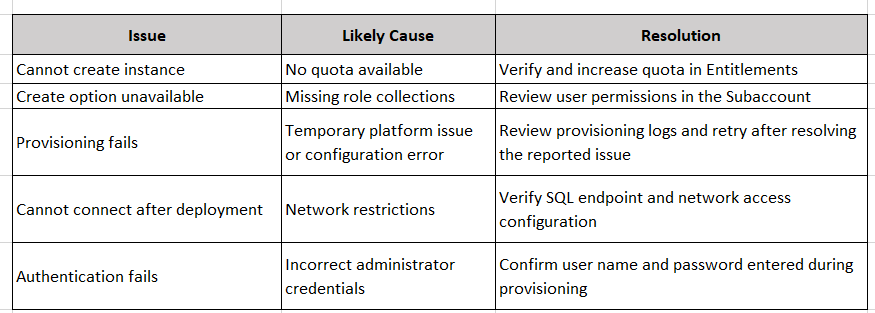
Best Practices
- Adopt consistent naming conventions for instances.
- Separate Development, QA, and Production into different subaccounts.
- Size memory according to workload rather than estimates alone.
- Plan for future storage growth.
- Create personal administrator accounts after deployment.
- Configure network access using the least-exposure principle.
- Document every provisioning decision for future operations.
Chapter Summary
In this chapter, you learned how to provision your first SAP HANA Cloud database, beginning with entitlement verification and role assignments, progressing through the provisioning wizard, and finishing with deployment validation and post-provisioning tasks. These steps establish a secure and well-governed database ready for ongoing administration.
Knowledge Check
- Which SAP BTP component is used to allocate SAP HANA Cloud entitlements?
- Why should you validate quotas before provisioning?
- What factors should influence memory sizing?
- Why is region selection considered a long-term design decision?
- What are the recommended post-provisioning administrative tasks?
- Why should personal administrator accounts be created after the initial deployment?
Next Chapter
You will learn how to:
- Establish secure SQL connectivity.
- Configure SAP HANA Database Explorer.
- Use JDBC and SQL clients.
- Understand SQL endpoints and TLS requirements.
- Troubleshoot connection and authentication issues.
- Execute your first administrative SQL commands.
This chapter marks the beginning of day-to-day database administration activities.
Follow me to catch the full series as it drops. Each article builds on the last.
#SAPAI #SAP #ArtificialIntelligence #MachineLearning #GenerativeAI #SAPConsultant #BusinessAI #Joule #SAPJoule #EnterpriseAI #S4HANA #SAPS4HANA #SuccessFactors #DigitalTransformation #SAPBTP #CAPM #SAPDeveloper #GenerativeAIHub #SAPAICore #MultiModel #GPT4 #Claude #Gemini #SAPBTPAI #ModelSelection #AIForBeginners #NoVendorLockIn #SAPCloud #CloudApplicationProgrammingModel #SAPTraining #SAPCareer #ABAP #SAPHANA #CloudComputing #EnterpriseApplications #TechSkills #CareerGrowth #Upskilling #JouleAgents #AgenticAI #SAPBuild #SAPIntegrationSuite #AutonomousEnterprise #FutureOfWork #BusinessTechnologyPlatform #SAPCommunity #Innovation #SAPSD #AIAgents #ERP #LearningInPublic #S4HANAPublicCloud #SAPPublicCloud #SAPLicensing #SAPCloudERP #CloudERP #BusinessTransformation #ITStrategy #EnterpriseArchitecture #SAPConsulting #SubscriptionModel #CloudMigration #TechnologyLeadership #CIO #EnterpriseTechnology #DigitalEnterprise #SAPLearning #SAPExperts #ERPTransformation #FutureOfERP #SAPCloudALM #ALMSummit2026 #SolutionManager #ApplicationLifecycleManagement #SAPAI #Joule #EnterpriseAI #S4HANA #AIAgents #SAPSecurity #BusinessAI #DigitalTransformation #SAPConsulting #Anthropic #SAP #SAPHANA #SAPHANACloud #SAPBTP #SAPBasis #CloudComputing #DatabaseAdministration #SAPTechnology #CloudArchitecture #DigitalTransformation