Chapter 7 is arguably the most important security chapter in the entire book. In SAP HANA Cloud, security is privilege-based, and understanding the authorization model is essential before administering production environments.
Chapter Objectives
After completing this chapter, you will be able to:
- Understand the SAP HANA Cloud authorization model.
- Differentiate between system, object, analytic, package, and application privileges.
- Create and manage custom database roles.
- Grant and revoke roles and privileges.
- Design least-privilege administrator roles.
- Understand inherited privileges.
- Monitor assigned roles.
- Implement authorization best practices for production systems.
7.1 Introduction
Authorization management is the foundation of SAP HANA Cloud security. Every action performed by a user—creating a schema, querying a table, backing up a database, or administering users—is controlled through privileges.
Rather than assigning privileges directly to users, SAP recommends creating roles that group related privileges. Roles simplify administration, improve auditability, and support the principle of least privilege.
7.2 Authorization Model
The authorization model is hierarchical:
User
   │
Assigned Role(s)
   │
Privileges
   │
Database Objects / Administrative Functions
A user may have multiple roles, and roles can contain many privileges.
Benefits of role-based access control (RBAC):
- Simplified administration
- Consistent access assignment
- Easier audits
- Reduced risk of excessive privileges
- Faster onboarding and offboarding
7.3 Types of Privileges
SAP HANA Cloud supports several privilege categories.
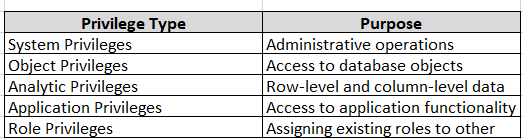
Note: Repository package privileges are associated with the classic SAP HANA repository model. Modern SAP HANA Cloud development primarily uses HDI (HANA Deployment Infrastructure), where authorization is managed differently.
7.4 System Privileges
System privileges authorize administrative actions across the database.
Examples include:
- USER ADMIN
- ROLE ADMIN
- CATALOG READ
- AUDIT ADMIN
- AUDIT OPERATOR
- BACKUP ADMIN
- DATABASE ADMIN
To view system privileges:
SELECT PRIVILEGE
FROM SYS.SYSTEM_PRIVILEGES
ORDER BY PRIVILEGE;
⚠ Best Practice
Avoid granting powerful system privileges directly to users.
7.5 Object Privileges
Object privileges control access to database objects.
Common object privileges include:
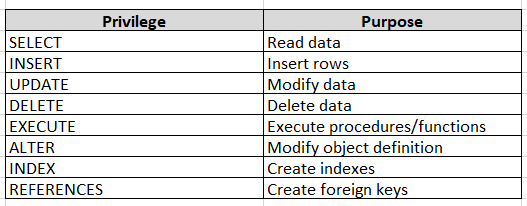
Example:
GRANT SELECT
ON SCHEMA SALES
TO REPORTING_ROLE;
7.6 Analytic Privileges
Analytic privileges restrict access to analytical data.
Typical use cases:
- Regional sales visibility
- Department-based reporting
- Country restrictions
- Business unit segregation
Example:
Sales Manager

↓

Analytic Privilege

↓

Country = Germany

↓

Visible Data Only
Unlike object privileges, analytic privileges filter accessible data rather than controlling access to the object itself.
7.7 Roles
Roles group privileges into reusable security packages.
Instead of:
User

↓

100 Privileges
Use:
User

↓

DBA_ROLE

↓

100 Privileges
Benefits:
- Simpler administration
- Easier reviews
- Centralized maintenance
- Consistent authorization
7.8 Creating a Role
Create a custom role:
CREATE ROLE BASIS_ADMIN_ROLE;
Verify:
SELECT ROLE_NAME
FROM SYS.ROLES
WHERE ROLE_NAME = 'BASIS_ADMIN_ROLE';
7.9 Granting System Privileges to a Role
Example:
GRANT USER ADMIN TO BASIS_ADMIN_ROLE;

GRANT ROLE ADMIN TO BASIS_ADMIN_ROLE;

GRANT CATALOG READ TO BASIS_ADMIN_ROLE;
⚠ Best Practice
Grant privileges to roles—not directly to users.
7.10 Granting Object Privileges
Grant schema access:
GRANT SELECT
ON SCHEMA SALES
TO BASIS_ADMIN_ROLE;
Grant table access:
GRANT SELECT
ON SALES.ORDERS
TO BASIS_ADMIN_ROLE;
Grant procedure execution:
GRANT EXECUTE
ON PROCEDURE SALES.UPDATE_ORDER
TO BASIS_ADMIN_ROLE;
7.11 Assigning Roles to Users
Assign the role:
GRANT BASIS_ADMIN_ROLE
TO BASIS_ADMIN;
Verify:
SELECT ROLE_NAME,
       GRANTEE
FROM SYS.GRANTED_ROLES
WHERE GRANTEE = 'BASIS_ADMIN';
7.12 Revoking Roles
Remove access:
REVOKE BASIS_ADMIN_ROLE
FROM BASIS_ADMIN;
7.13 Direct Privileges vs Roles
Avoid
User

↓

SELECT

INSERT

DELETE

UPDATE

EXECUTE

...
Recommended
User

↓

REPORTING_ROLE

↓

Privileges
Role-based administration significantly reduces complexity.
7.14 Inherited Roles
Roles can contain other roles.
Example:
SAP_ADMIN

↓

SECURITY_ADMIN_ROLE

↓

USER_ADMIN_ROLE

↓

CATALOG_READ_ROLE
This hierarchy simplifies large enterprise authorization models.
7.15 Viewing Assigned Roles
List assigned roles:
SELECT ROLE_NAME,
       GRANTEE
FROM SYS.GRANTED_ROLES
ORDER BY ROLE_NAME;
7.16 Viewing Privileges
System privileges:
SELECT *
FROM SYS.GRANTED_PRIVILEGES;
Object privileges:
SELECT *
FROM SYS.GRANTED_OBJECT_PRIVILEGES;
These views help administrators review current authorizations.
7.17 Designing a Custom DBA Role
Rather than using a highly privileged built-in administrative account for daily work, create a custom role containing only the privileges required for routine administration.
Example responsibilities:
- User administration
- Role assignment
- Catalog read access
- Monitoring
- Backup operations
- Audit review
Avoid including unnecessary privileges such as those intended for specialized development or unrestricted system administration unless they are operationally required.
⚠ Best Practice
Maintain separate roles for:
- Security Administration
- Database Administration
- Monitoring
- Backup Operations
- Read-only Support
This separation supports the principle of least privilege and segregation of duties.
7.18 Least-Privilege Design
Recommended model:
Security Admin

↓

SECURITY_ROLE

Database Admin

↓

DBA_ROLE

Monitoring Team

↓

MONITOR_ROLE

Application

↓

APP_ROLE
Each role contains only the privileges required for its function.
7.19 Common Authorization Issues
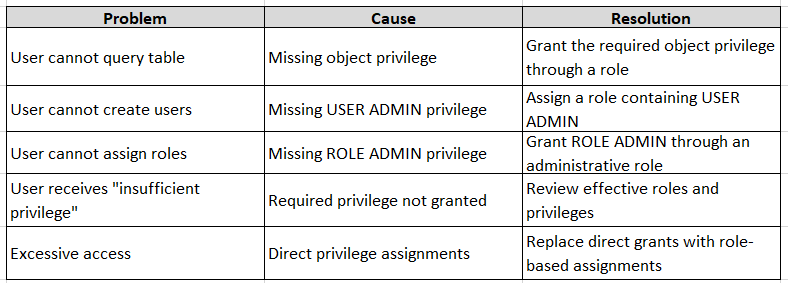
7.20 Security Best Practices
- Use custom roles instead of assigning privileges directly.
- Create named administrator accounts.
- Separate administrative duties.
- Apply least-privilege principles.
- Periodically review role assignments.
- Remove unused roles.
- Document all custom roles.
- Avoid granting administrative privileges to application users.
- Review inherited roles during security audits.
Chapter Summary
This chapter introduced the SAP HANA Cloud authorization model and explained how roles and privileges work together to secure database access. You learned the differences between system, object, and analytic privileges, how to create and assign custom roles, and why role-based access control is essential for scalable and secure administration.
Hands-On Exercise
- Create a role:
CREATE ROLE REPORTING_ROLE;
- Grant read access to a schema:
GRANT SELECT
ON SCHEMA SALES
TO REPORTING_ROLE;
- Assign the role to a user:
GRANT REPORTING_ROLE
TO TEST_ADMIN;
- Verify the assignment:
SELECT ROLE_NAME,
       GRANTEE
FROM SYS.GRANTED_ROLES
WHERE GRANTEE = 'TEST_ADMIN';
- Revoke the role:
REVOKE REPORTING_ROLE
FROM TEST_ADMIN;
Knowledge Check
- What is the difference between a system privilege and an object privilege?
- Why are roles preferred over direct privilege assignments?
- Which SQL statement creates a custom role?
- How do analytic privileges differ from object privileges?
- Which system view lists role assignments?
- Why is least-privilege design important in production systems?
Next Chapter
The next chapter will cover:
- Monitoring database health
- Memory utilization
- CPU and workload analysis
- Active connections
- Expensive SQL statements
- Alerts and diagnostics
- System views for performance analysis
- Operational monitoring best practices
This chapter introduces the day-to-day monitoring activities required to maintain a healthy SAP HANA Cloud environment.
Follow me to catch the full series as it drops. Each article builds on the last.
#SAPAI #SAP #ArtificialIntelligence #MachineLearning #GenerativeAI #SAPConsultant #BusinessAI #Joule #SAPJoule #EnterpriseAI #S4HANA #SAPS4HANA #SuccessFactors #DigitalTransformation #SAPBTP #CAPM #SAPDeveloper #GenerativeAIHub #SAPAICore #MultiModel #GPT4 #Claude #Gemini #SAPBTPAI #ModelSelection #AIForBeginners #NoVendorLockIn #SAPCloud #CloudApplicationProgrammingModel #SAPTraining #SAPCareer #ABAP #SAPHANA #CloudComputing #EnterpriseApplications #TechSkills #CareerGrowth #Upskilling #JouleAgents #AgenticAI #SAPBuild #SAPIntegrationSuite #AutonomousEnterprise #FutureOfWork #BusinessTechnologyPlatform #SAPCommunity #Innovation #SAPSD #AIAgents #ERP #LearningInPublic #S4HANAPublicCloud #SAPPublicCloud #SAPLicensing #SAPCloudERP #CloudERP #BusinessTransformation #ITStrategy #EnterpriseArchitecture #SAPConsulting #SubscriptionModel #CloudMigration #TechnologyLeadership #CIO #EnterpriseTechnology #DigitalEnterprise #SAPLearning #SAPExperts #ERPTransformation #FutureOfERP #SAPCloudALM #ALMSummit2026 #SolutionManager #ApplicationLifecycleManagement #SAPAI #Joule #EnterpriseAI #S4HANA #AIAgents #SAPSecurity #BusinessAI #DigitalTransformation #SAPConsulting #Anthropic #SAP #SAPHANA #SAPHANACloud #SAPBTP #SAPBasis #CloudComputing #DatabaseAdministration #SAPTechnology #CloudArchitecture #DigitalTransformation