Current-version note: This chapter is aligned with SAP HANA Cloud documentation for QRC 2/2026. Network configuration options, private connectivity capabilities, client requirements, and UI labels can evolve by hyperscaler, region, and HANA Cloud revision. Always validate the options exposed for the specific instance before implementing them in production. (SAP Help Portal)
Chapter Objectives
After completing this chapter, you will be able to:
- Understand the SAP HANA Cloud network architecture.
- Identify the SQL endpoint and ingress path.
- Configure trusted source IP addresses.
- Understand SAP HANA Cloud public connectivity.
- Secure external SQL access using IP allowlists.
- Understand SAP BTP Cloud Foundry connectivity.
- Configure private connectivity where supported.
- Understand SAP Connectivity service and Cloud Connector.
- Distinguish inbound and outbound connectivity.
- Troubleshoot common network connection failures.
- Design a secure production connectivity architecture.
10.1 Introduction
Network security is one of the areas where SAP HANA Cloud administration differs significantly from traditional on-premise SAP HANA administration.
In an on-premise environment, a Basis administrator may control:
- Network interfaces
- Firewalls
- Routing
- Load balancers
- DNS
- Database ports
- Security zones
With SAP HANA Cloud, much of the underlying infrastructure is managed by SAP and the hyperscaler.
The administrator instead works primarily with:
- SAP HANA Cloud instance configuration
- Trusted IP addresses
- SQL endpoints
- TLS
- SAP BTP connectivity
- Cloud Connector
- Private connectivity options
- Application-level security
SAP HANA Cloud database instances are exposed through secure endpoints, and client connections are protected using TLS/SSL. By default, access is restricted, with SAP BTP connectivity handled according to the service’s security model. (SAP Help Portal)
10.2 Network Architecture
A simplified architecture is:
                  Internet / Corporate Network
                           │
                           │ TLS
                           ▼
                  SAP HANA Cloud Endpoint
                           │
                  ┌────────┴────────┐
                  │                 │
             IP Allowlist       TLS/SNI
                  │                 │
                  └────────┬────────┘
                           │
                           ▼
                   SAP HANA Database
For private connectivity:
Corporate / Cloud VPC
        │
        │ Private Network
        ▼
Private Endpoint
        │
        ▼
SAP HANA Cloud
        │
        ▼
HANA Database
For on-premise integration:
On-Premise Network
       │
       │
Cloud Connector
       │
       ▼
SAP BTP Connectivity
       │
       ▼
SAP HANA Cloud
10.3 SQL Endpoint
Every SAP HANA Cloud database has an SQL endpoint used by database clients.
Where to find it
SAP HANA Cloud Central → Database Instance → Overview
Depending on the current UI, you can find connection information such as:
- Host
- SQL endpoint
- SQL port
- Database status
- Connection information
SAP documents that current SAP HANA Cloud production client access to the database is performed through TCP connections on port 443. (SAP Help Portal)
⚠ Important
Do not assume that the port behavior is identical to an on-premise HANA installation. SAP HANA Cloud uses its managed endpoint architecture.
10.4 TLS Security
All external database connectivity should use encrypted communication.
SAP HANA Cloud uses TLS to secure SAP HANA client connections. (SAP Help Portal)
Conceptually:
Client
  │
  │ TLS-encrypted connection
  ▼
SAP HANA Cloud Endpoint
  │
  ▼
SAP HANA Database
TLS protects:
- Credentials
- SQL statements
- Result sets
- Database traffic
10.5 Client Certificate and Trust Requirements
The client must trust the certificate chain used by the SAP HANA Cloud endpoint.
SAP’s current documentation specifies client-side requirements for secure connections. For example, secure JDBC connections require supported SAP HANA JDBC client versions, while SQLDBC-based clients use supported cryptographic libraries. (SAP Help Portal)
For encrypted connection issues, verify that the client trust store contains the required SAP HANA Cloud root certificates.
SAP currently documents the need to trust:
- DigiCert Global Root CA
- DigiCert Global Root G5
for relevant client configurations. (SAP Help Portal)
⚠ Common Mistake
A connection failure that looks like a firewall problem may actually be a TLS trust-store problem.
10.6 IP Allowlisting
IP allowlisting is one of the most important network controls for SAP HANA Cloud.
SAP recommends restricting database access to known source IP addresses rather than allowing unrestricted access. (SAP Help Portal)
Where
SAP HANA Cloud Central → Database Instance → Manage Configuration → Connections
Depending on the current UI, the setting may be presented as:
Allowed Connections / Trusted IP Addresses / IP Allowlist
The exact label can change with the HANA Cloud administration UI.
10.7 Allowing Specific IP Addresses
You can specify individual IP addresses or CIDR ranges.
Examples:
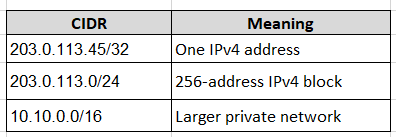
203.0.113.45/32
Single IPv4 address.
Example:
203.0.113.0/24
Network range.
SAP currently allows up to 900 IP addresses/IP filter ranges for the database instance. (SAP Help Portal)
10.8 CIDR Notation
CIDR is important when configuring allowlists.
Examples:
⚠ Best Practice
Use /32 for individual administrative workstations whenever practical instead of unnecessarily allowing an entire corporate network.
10.9 Allowlist Example
Suppose your corporate NAT gateway has:
203.0.113.45
and your administration jump host has:
198.51.100.25
You could allow:
203.0.113.45/32
198.51.100.25/32
This is preferable to:
0.0.0.0/0
which effectively allows connections from any IPv4 source, subject to other security controls.
SAP explicitly recommends limiting access to specific IP addresses. (SAP Help Portal)
10.10 ⚠ The 0.0.0.0/0 Gotcha
This configuration:
0.0.0.0/0
means:
Allow all IPv4 source addresses.
It can be useful for temporary troubleshooting, but it should generally not be used as the permanent production configuration.
A common troubleshooting mistake is:
Connection fails
      ↓
Allow 0.0.0.0/0
      ↓
Connection works
      ↓
Leave it permanently
Instead:
Troubleshoot
     ↓
Identify actual source IP
     ↓
Allow required CIDR
     ↓
Remove broad temporary access
10.11 SAP BTP Cloud Foundry Connectivity
SAP HANA Cloud has special integration with SAP BTP.
When specific IP addresses are configured, SAP components requiring access to the database are automatically allowed on the SQL port. This includes applications running in the Cloud Foundry environment in the same BTP region. (SAP Help Portal)
This is important for architectures such as:
SAP BTP Cloud Foundry
        │
        ▼
Application
        │
        ▼
SAP HANA Cloud
You do not necessarily need to expose the database to the entire public Internet simply because an application is running in Cloud Foundry.
10.12 Cross-Region BTP Connectivity
A common design issue is:
BTP Region A
     │
     ▼
SAP HANA Cloud Region B
SAP documents that cross-region connections are not enabled by default for security reasons. For such scenarios, the corresponding NAT address needs to be explicitly allowed. (SAP Help Portal)
⚠ Gotcha
Do not assume:
“Both services are on SAP BTP, therefore they can automatically communicate.”
Region matters.
10.13 Finding SAP HANA Cloud IP Information
SAP publishes the current ingress and egress IP information for HANA Cloud landscapes.
Where
SAP HANA Cloud Administration Guide → Domains and IP Ranges
SAP distinguishes between:
- LB IPs – ingress traffic
- NAT IPs – egress traffic
- Regional domains
SAP recommends adding all relevant IP addresses for the region when required, because actively used addresses can change over time. (SAP Help Portal)
10.14 Inbound vs Outbound Connectivity
This distinction is critical.
Inbound
A client connects to SAP HANA Cloud.
Example:
SAP HANA Database Explorer
        │
        ▼
SAP HANA Cloud
Typical controls:
- TLS
- IP allowlist
- Private Link
- Authentication
Outbound
SAP HANA Cloud connects from the database to another system.
Example:
SAP HANA Cloud
      │
      ▼
Remote Data Source
Potential technologies include:
- Cloud Connector
- SDA
- SDI
- Internet-based remote sources
- Private connectivity
Do not use the same network design assumptions for inbound and outbound traffic.
10.15 SAP Connectivity Service and Cloud Connector
SAP Cloud Connector is particularly relevant for connecting SAP HANA Cloud to on-premise systems.
Typical architecture:
              SAP BTP
                 │
                 ▼
         SAP HANA Cloud
                 │
        Connectivity Service
                 │
                 ▼
          Cloud Connector
                 │
                 ▼
       Corporate Network
                 │
        ┌────────┴────────┐
        ▼                 ▼
   SAP HANA          SAP ABAP
   On-Premise        On-Premise
SAP documents the Cloud Connector approach for SAP HANA Cloud access to remote on-premise systems. (SAP Help Portal)
10.16 Cloud Connector Prerequisites
For HANA Cloud to access an on-premise SAP HANA system through Cloud Connector, SAP documents prerequisites including:
- SAP HANA Cloud instance
- Connectivity proxy enabled where required
- Cloud Connector installed and configured
- Appropriate network connectivity
- Matching Cloud Foundry subaccount
- Correct backend mapping
10.17 Cloud Connector Configuration
Where
SAP Cloud Connector → Subaccount → Cloud To On-Premise → Access Control
Choose:
Add (+) → Add System Mapping
For an SAP HANA backend:
Backend Type:
SAP HANA

Protocol:
TCP or TCP SSL
Then define:
- Internal Host
- Internal Port
- Virtual Host
- Virtual Port
SAP recommends testing the internal host mapping during configuration. (SAP Help Portal)
10.18 Why Virtual Host Matters
Cloud Connector separates the external virtual representation from the internal backend address.
Example:
Cloud / HANA Cloud
       │
       ▼
virtual-hana.company.internal:30015
       │
       ▼
Cloud Connector
       │
       ▼
hana-prod.internal:30015
This avoids exposing internal infrastructure addressing directly.
10.19 Private Connectivity
For environments requiring private network paths, SAP HANA Cloud supports Private Link integrations with supported hyperscaler networking services.
SAP’s current configuration documentation describes Private Link as a mechanism allowing services in a hyperscaler’s VPC to establish connections to an SAP HANA Cloud database instance. (SAP Help Portal)
Conceptually:
Customer VPC
     │
     │ Private Endpoint
     ▼
Private Link
     │
     ▼
SAP HANA Cloud
This can reduce reliance on public Internet paths.
10.20 Private Link Configuration
Where
SAP HANA Cloud Central → Database Instance → Manage Configuration → Connections
Depending on the hyperscaler, you may configure:
Private Link Endpoint IDs
SAP currently documents support for specifying endpoint IDs, with up to 100 endpoint IDs for the database configuration. (SAP Help Portal)
The exact configuration steps differ by hyperscaler.
10.21 AWS Private Connectivity
For AWS-based SAP HANA Cloud regions, the implementation uses AWS private networking capabilities.
The architecture is conceptually:
AWS VPC
   │
   ▼
VPC Endpoint
   │
   ▼
SAP HANA Cloud Private Service
   │
   ▼
HANA Database
The exact endpoint and security-group configuration belongs to the AWS side of the architecture and must be coordinated with the SAP HANA Cloud configuration.
10.22 Azure Private Connectivity
The equivalent architecture on Microsoft Azure uses Azure private networking capabilities.
Azure VNet
    │
    ▼
Private Endpoint
    │
    ▼
SAP HANA Cloud
Firewall, DNS, routing, and endpoint authorization must be designed together.
10.23 Google Cloud Private Connectivity
SAP documents private connectivity for Google Cloud using the Google Cloud VPC and the appropriate Private Link endpoint configuration. (SAP Help Portal)
A simplified architecture:
Google Cloud VPC
       │
       ▼
Private Endpoint
       │
       ▼
SAP HANA Cloud
10.24 Restricting Public Access
Private connectivity alone does not automatically mean that all public access has been eliminated.
For supported configurations, SAP documents an option to restrict access to Cloud Foundry IPs in the BTP region while using private connectivity. (SAP Help Portal)
Therefore, production design should explicitly answer:
Should the database remain reachable through its public endpoint?
If the answer is no, design and test the appropriate private-only architecture rather than assuming Private Link automatically disables every public path.
10.25 Network Security Layers
A secure architecture should use multiple controls.
              User / Application
                      │
                      ▼
               Network Path
                      │
            ┌─────────┴─────────┐
            │                   │
         Firewall          Private Link
            │                   │
            └─────────┬─────────┘
                      ▼
                IP Allowlist
                      │
                      ▼
                     TLS
                      │
                      ▼
               HANA Authentication
                      │
                      ▼
              HANA Authorization
Network access is only one layer of security.
10.26 Firewall Configuration
If users connect from a corporate network, identify the actual source IP reaching SAP HANA Cloud.
For example:
User PC
   ↓
Corporate Firewall
   ↓
NAT Gateway
   ↓
Internet
   ↓
SAP HANA Cloud
SAP HANA Cloud may see:
203.0.113.50
rather than the user’s workstation IP.
⚠ Common Mistake
Allowlisting the user’s local workstation address when the connection actually originates from the corporate NAT gateway will not solve the problem.
10.27 DNS and Endpoint Testing
From an authorized client, test DNS resolution before troubleshooting authentication.
Example:
nslookup <hana-cloud-host>
or:
dig <hana-cloud-host>
Then test network reachability according to your organization’s security policies.
Do not interpret a failed ping as proof that the database is unavailable. ICMP may not be supported or relevant to the database endpoint.
10.28 Testing TCP Connectivity
For a client using the database endpoint:
nc -vz <hana-cloud-host> 443
or, where appropriate:
telnet <hana-cloud-host> 443
The objective is to determine whether the TCP path is available.
⚠ Important
A successful TCP connection does not prove that:
- TLS validation works
- Authentication works
- The database user has sufficient privileges
It only establishes network-level reachability.
10.29 Testing TLS
Use an appropriate TLS diagnostic tool from an authorized environment, for example:
openssl s_client -connect <hana-cloud-host>:443 -servername <hana-cloud-host>
Review:
- Certificate chain
- TLS handshake
- Server name indication
- Certificate validity
⚠ Use the actual SAP HANA Cloud endpoint provided for your instance. Do not substitute arbitrary hostnames.
10.30 Connection Troubleshooting Methodology
When a user reports:
“I cannot connect to SAP HANA Cloud.”
Do not immediately reset the password.
Use this sequence:
1. Database running?
        ↓
2. DNS resolving?
        ↓
3. TCP connectivity?
        ↓
4. Source IP allowed?
        ↓
5. TLS handshake?
        ↓
6. Client compatibility?
        ↓
7. Authentication?
        ↓
8. Database authorization?
This prevents mixing network, TLS, authentication, and authorization problems.
10.31 Troubleshooting Matrix
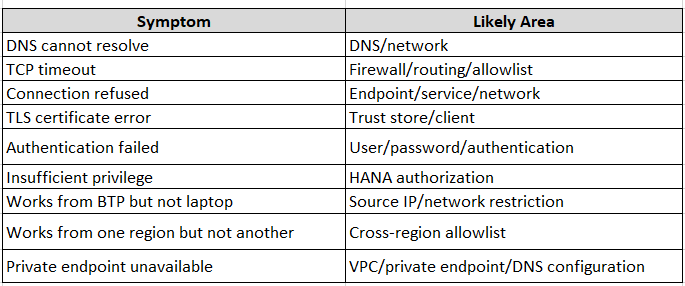
10.32 SAP HANA Client Compatibility
SAP HANA Cloud requires supported client software for secure connectivity.
SAP’s current documentation states, for example, that OpenSSL-based SQLDBC connections require SAP HANA client 2.4.167 or higher, while secure JDBC connections require SAP HANA JDBC client 2.4.67 or higher. (SAP Help Portal)
⚠ Version-sensitive
Do not copy old on-premise client requirements into a HANA Cloud implementation. Check the current SAP HANA Cloud security guide before standardizing client versions.
10.33 Security Design for Administrative Access
For Basis administration, a recommended pattern is:
Administrator
     │
     ▼
Corporate Network
     │
     ▼
Secure Jump Host
     │
     ▼
Firewall / NAT
     │
     ▼
IP Allowlist
     │
     ▼
TLS
     │
     ▼
SAP HANA Cloud
     │
     ▼
Named Admin User
     │
     ▼
Least-Privilege DBA Role
This is preferable to allowing every administrator’s home or workstation IP directly.
10.34 Production Network Architecture
A mature production design could look like:
                    Enterprise Network
                           │
                    Security Controls
                           │
                ┌──────────┴──────────┐
                │                     │
           Admin Access          Application
                │                     │
           Jump Host              BTP CF
                │                     │
                └──────────┬──────────┘
                           │
                     Secure Network
                           │
                ┌──────────┴──────────┐
                │                     │
          Public/TLS Path       Private Path
                │                     │
                └──────────┬──────────┘
                           ▼
                   SAP HANA Cloud
                           │
                    HANA Security
                           │
                    Roles/Privileges
The exact architecture should be adapted to the customer’s security requirements and available hyperscaler services.
10.35 Recommended Production Configuration
For a production database:
Network
- Use TLS.
- Restrict source IPs.
- Avoid 0.0.0.0/0 unless there is a justified requirement.
- Use private connectivity where required.
- Separate administrative and application access where practical.
Client
- Use supported SAP HANA client versions.
- Maintain current trust certificates.
- Standardize client configuration.
- Avoid storing passwords in scripts.
Cloud Connector
- Use only where the integration architecture requires it.
- Restrict backend mappings.
- Avoid unnecessarily broad network exposure.
Monitoring
- Monitor failed connection attempts.
- Monitor endpoint availability.
- Review network changes.
- Document allowlist modifications.
10.36 Network Change Management
Network changes should follow the same discipline as SAP Basis transport or infrastructure changes.
Recommended workflow:
Change Request
      ↓
Identify Source/Destination
      ↓
Determine Required Ports
      ↓
Determine IP/CIDR
      ↓
Security Review
      ↓
Implement
      ↓
Connectivity Test
      ↓
Application Test
      ↓
Document
⚠ Best Practice
Never remove an existing production allowlist entry without first determining which application or integration depends on it.
10.37 Hands-On Exercise
Exercise 1 — Identify SQL Endpoint
Where
SAP HANA Cloud Central → Database Instance → Overview
Record:
- Host
- SQL endpoint
- Database status
Exercise 2 — Review Allowed Connections
Where
SAP HANA Cloud Central → Database Instance → Manage Configuration → Connections
Document:
- Current trusted IPs
- CIDR ranges
- Cloud Foundry access
- Private connectivity settings, if configured
Exercise 3 — Test DNS
From an authorized administration workstation:
nslookup <hana-cloud-host>
Confirm that the hostname resolves correctly.
Exercise 4 — Test TCP
nc -vz <hana-cloud-host> 443
Confirm TCP connectivity.
Exercise 5 — Test TLS
openssl s_client
-connect <hana-cloud-host>:443
-servername <hana-cloud-host>
Review the certificate chain.
10.38 Knowledge Check
- What is the purpose of an SAP HANA Cloud SQL endpoint?
- Why should IP allowlisting be used?
- What does /32 represent in CIDR notation?
- Why is 0.0.0.0/0 generally inappropriate for production?
- What is the difference between inbound and outbound connectivity?
- When should Cloud Connector be used?
- What problem does Private Link address?
- Why might a user need a NAT IP rather than their workstation IP added to the allowlist?
- What is the difference between a TCP connectivity problem and a TLS problem?
- Why must client versions be checked against current SAP HANA Cloud requirements?
10.39 Chapter Summary
Secure network configuration is a combination of connectivity, encryption, source restriction, private networking, and database authorization.
The key operational model is:
Network Reachability
        ↓
IP Allowlist
        ↓
TLS
        ↓
Authentication
        ↓
Authorization
        ↓
Database Access
A successful network connection does not mean that the user is authorized to perform an operation, and a valid database password does not prove that the network path is correctly configured.
For production SAP HANA Cloud environments, administrators should therefore treat network, TLS, identity, and authorization as separate security layers.
Next Chapter
Chapter 11 – SAP HANA Cloud Security, Auditing and Compliance
The next chapter will cover:
- SAP HANA Cloud security architecture
- Audit policies
- Audit trail configuration
- Security monitoring
- Failed authentication monitoring
- Privilege reviews
- User and role governance
- Compliance considerations
- Custom security controls
- Least-privilege administration
- Security incident investigation
This will build directly on Chapters 6, 7, and 10 and bring identity, authorization, network security, and auditing together into a practical SAP HANA Cloud security operating model.
Follow me to catch the full series as it drops. Each article builds on the last.
#SAPAI #SAP #ArtificialIntelligence #MachineLearning #GenerativeAI #SAPConsultant #BusinessAI #Joule #SAPJoule #EnterpriseAI #S4HANA #SAPS4HANA #SuccessFactors #DigitalTransformation #SAPBTP #CAPM #SAPDeveloper #GenerativeAIHub #SAPAICore #MultiModel #GPT4 #Claude #Gemini #SAPBTPAI #ModelSelection #AIForBeginners #NoVendorLockIn #SAPCloud #CloudApplicationProgrammingModel #SAPTraining #SAPCareer #ABAP #SAPHANA #CloudComputing #EnterpriseApplications #TechSkills #CareerGrowth #Upskilling #JouleAgents #AgenticAI #SAPBuild #SAPIntegrationSuite #AutonomousEnterprise #FutureOfWork #BusinessTechnologyPlatform #SAPCommunity #Innovation #SAPSD #AIAgents #ERP #LearningInPublic #S4HANAPublicCloud #SAPPublicCloud #SAPLicensing #SAPCloudERP #CloudERP #BusinessTransformation #ITStrategy #EnterpriseArchitecture #SAPConsulting #SubscriptionModel #CloudMigration #TechnologyLeadership #CIO #EnterpriseTechnology #DigitalEnterprise #SAPLearning #SAPExperts #ERPTransformation #FutureOfERP #SAPCloudALM #ALMSummit2026 #SolutionManager #ApplicationLifecycleManagement #SAPAI #Joule #EnterpriseAI #S4HANA #AIAgents #SAPSecurity #BusinessAI #DigitalTransformation #SAPConsulting #Anthropic #SAP #SAPHANA #SAPHANACloud #SAPBTP #SAPBasis #CloudComputing #DatabaseAdministration #SAPTechnology #CloudArchitecture #DigitalTransformation