Version note: This chapter reflects the current SAP HANA Cloud administration model documented for QRC 2/2026. SAP continues to evolve HA/DR options, availability-zone placement, and recovery capabilities, so always verify the options exposed in your specific region and instance configuration. (SAP Help Portal)
Chapter Objectives
After completing this chapter, you will be able to:
- Understand SAP HANA Cloud backup architecture.
- Explain RPO and RTO requirements.
- Configure and review backup retention.
- Understand continuous log backup and daily data backup.
- Perform point-in-time recovery.
- Understand SAP HANA Cloud high availability.
- Differentiate synchronous and asynchronous replication.
- Understand single-region and multi-region DR.
- Plan HA/DR according to business requirements.
- Monitor replication and takeover status.
- Develop an operational recovery procedure.
9.1 Introduction
For a production SAP HANA Cloud database, provisioning and security are only part of the administration responsibility.
The next critical question is:
What happens when the database, availability zone, or entire region becomes unavailable?
This is where backup, recovery, high availability (HA), and disaster recovery (DR) become important.
SAP HANA Cloud provides managed backup and recovery capabilities, while optional replica-based configurations can provide additional resilience against infrastructure failures. Backups and replicas serve different purposes and should not be treated as interchangeable technologies.
A useful conceptual model is:
                    SAP HANA CLOUD
                          │
             ┌────────────┴────────────┐
             │                         │
          BACKUP                     REPLICA
             │                         │
       Recovery from              Fast takeover /
       previous state             availability
             │                         │
       ┌─────┴─────┐             ┌─────┴─────┐
       │           │             │           │
     Data        Log           Synchronous  Async
    Backup      Backup         Replication  Replication
       │           │             │           │
       └─────┬─────┘             │           │
             │                   │           │
        Point-in-Time            HA          DR
          Recovery
9.2 Backup vs High Availability vs Disaster Recovery
These concepts solve different problems.
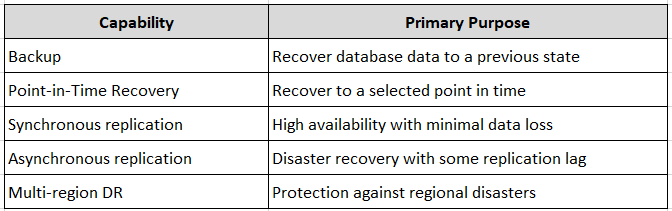
⚠ Important
A backup is not a substitute for HA, and HA is not a substitute for a proper DR strategy.
9.3 Recovery Objectives
Two terms must be defined before designing the solution.
Recovery Point Objective — RPO
RPO answers:
How much data can the business afford to lose?
For SAP HANA Cloud backup-based recovery, SAP documents a maximum RPO of 15 minutes. Point-in-time recovery can normally achieve a much smaller practical recovery point because log backups are written continuously, but the documented maximum remains 15 minutes. (SAP Help Portal)
Example:
Failure:       14:30
Latest usable recovery point: <= 14:15
Potential data loss: <= 15 minutes
Recovery Time Objective — RTO
RTO answers:
How quickly must the service become operational again?
For example:
Business requirement:
RTO = 60 minutes

Database recovery must complete
within the 60-minute target.
⚠ Best Practice
Do not design HA/DR based only on technical capabilities. Start with the business-defined RPO and RTO.
9.4 SAP HANA Cloud Backup Architecture
SAP HANA Cloud automatically protects database data using data and log backups.
SAP documents the following model:
- Data backups are created automatically once per day when the database is online.
- Log backups are generated continuously.
- The initial data backup is created during provisioning.
- Backups are compressed.
- Backups are encrypted.
- Backups are stored in regional object storage. (SAP Help Portal)
The simplified architecture is:
             SAP HANA Cloud
                   │
          ┌────────┴────────┐
          │                 │
     Data Backup        Log Backup
     Once Daily         Continuous
          │                 │
          └────────┬────────┘
                   │
                   ▼
          Regional Object Store
                   │
                   ▼
             Recovery
9.5 Backup Encryption
SAP HANA Cloud backups are encrypted using AES-256 in CTR mode, with encryption keys assigned to database/log backup data. SAP also notes that the underlying infrastructure provides an additional encryption layer. (SAP Help Portal)
This is important for compliance and data-protection requirements.
9.6 Backup Retention
Backup retention determines how far back you can recover using the retained backup history.
The current SAP documentation states that the default retention period for SAP HANA database backups is 14 days, with configurable retention up to 215 days, subject to the service and configuration available for the instance. (SAP Help Portal)
Where to configure
SAP HANA Cloud Central → Database Instance → Manage Configuration → Backup
The exact labels and available values can vary by current HANA Cloud UI/version.
⚠ Do not assume that increasing retention automatically satisfies your DR requirements.
Longer retention provides a larger recovery window, but it does not provide the same protection as an independent replica or multi-region DR architecture.
9.7 Choosing Backup Retention
Consider:
- Regulatory requirements
- Business recovery requirements
- Data-change frequency
- Storage consumption
- Application recovery requirements
- Audit requirements
Example:
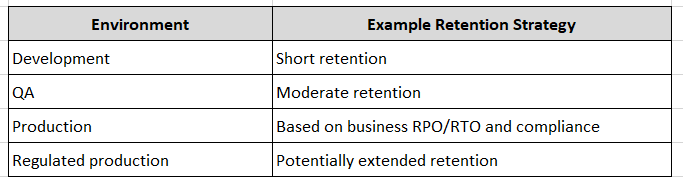
The actual retention value should be determined by organizational policy rather than simply copying the production value into every environment.
9.8 Monitoring Backup Status
Where
SAP HANA Cloud Central → Database Instance → Backups
Review:
- Last successful backup
- Backup history
- Recovery availability
- Retention configuration
SAP also provides backup catalog information through SAP HANA cockpit. (SAP Help Portal)
⚠ Operational Rule
A backup strategy is incomplete unless successful backup execution is regularly monitored.
9.9 Point-in-Time Recovery
Point-in-time recovery (PITR) allows the database to be restored to a selected point in time covered by the available backup and log history.
Typical scenario:
10:00  Normal operation
10:15  Application deployment
10:22  Data corruption
10:30  Problem detected
         │
         ▼
Recover to 10:21
This is one of the most important recovery capabilities for production environments.
9.10 Initiating Recovery
Where
SAP HANA Cloud Central → Database Instance → Actions → Start Recovery
SAP HANA Cloud allows recovery to a selected point in time, subject to the available recovery history. (SAP Help Portal)
Before initiating recovery:
- Confirm the incident.
- Identify the desired recovery timestamp.
- Confirm the required recovery window is available.
- Identify application dependencies.
- Communicate expected downtime.
- Record the recovery decision.
- Start recovery.
⚠ Critical
Recovery is a destructive operational action against the affected database state. Do not select a recovery timestamp casually.
9.11 Recreate Instance
SAP HANA Cloud also provides Recreate Instance functionality.
This can be useful when an availability zone becomes unavailable or when you need to recover an instance into another availability zone.
SAP documents that the instance can be recreated from the most recent available backup. (SAP Help Portal)
Where
SAP HANA Cloud Central → Database Instance → Actions → Recreate Instance
⚠ Important
Recreation from backup is fundamentally different from takeover of a synchronized replica.
9.12 High Availability
High Availability is designed to reduce service interruption when infrastructure or database components fail.
SAP HANA Cloud can maintain redundant replicas that are synchronized using transaction log replication. (SAP Help Portal)
Conceptually:
              Application
                   │
                   ▼
              Primary DB
                   │
          Transaction Logs
                   │
                   ▼
              Replica DB
If a failure occurs, a takeover can move database operation to the replica.
9.13 Synchronous Replication
With synchronous replication, the transaction log is persisted on the replica before the transaction is considered committed.
This provides strong protection against data loss.
SAP documents synchronous replication as the option capable of providing the fastest takeover, particularly when the replica is in the same availability zone. Synchronous replication can also be configured across different availability zones. (SAP Help Portal)
Simplified:
Primary
   │
   │ Synchronous
   ▼
Replica

Commit
  ▲
  │
Both sides synchronized
Advantages
- Very low data-loss exposure
- Fast takeover
- Suitable for HA requirements
Considerations
- Additional resource cost
- Replication latency
- Availability-zone design
- Workload requirements
9.14 Asynchronous Replication
With asynchronous replication, transaction logs are replicated to the secondary system without requiring the primary transaction to wait for synchronization.
This is useful for DR scenarios where the replica is farther away.
Primary
   │
   │ Async replication
   ▼
Secondary
The trade-off is potential data loss if the primary fails before all logs have reached the secondary.
For single-region asynchronous DR, SAP documents a maximum RPO of 15 minutes. Manual takeover is supported. (SAP Help Portal)
9.15 Availability Zones
Availability zones provide physically separated infrastructure within a cloud region.
A resilient architecture can distribute the primary and replica across different zones.
Region
│
├── Availability Zone A
│       └── Primary
│
└── Availability Zone B
        └── Replica
SAP HANA Cloud supports automatic or manual availability-zone placement depending on the configuration. Availability-zone support and memory limits can vary by hyper scaler and region. (SAP Help Portal)
⚠ Gotcha
If automatic availability-zone assignment is selected during instance creation, SAP documentation states that the placement cannot subsequently be changed directly. Alternative migration/recreation approaches may be required. (SAP Help Portal)
9.16 Single-Region High Availability
A single-region HA design protects primarily against infrastructure failures within the region.
Possible configurations include:
             Region
        ┌───────────────┐
        │               │
        │ Primary       │
        │    │          │
        │    │ Sync     │
        │    ▼          │
        │ Replica       │
        │               │
        └───────────────┘
Synchronous replication can be configured within the same zone or across different availability zones depending on the chosen architecture. (SAP Help Portal)
9.17 Single-Region Disaster Recovery
SAP HANA Cloud can also use an asynchronous replica in another availability zone within the same region.
               Region
       ┌───────────────────┐
       │                   │
       │ Zone A             │
       │ Primary            │
       │    │              │
       │    │ Async        │
       │    ▼              │
       │ Zone B             │
       │ DR Replica         │
       │                   │
       └───────────────────┘
SAP currently documents one asynchronous replica in another availability zone for this scenario. Manual takeover is supported. (SAP Help Portal)
9.18 Multi-Region Disaster Recovery
For protection against a complete regional outage, a multi-region DR architecture may be required.
Conceptually:
             Region A
        ┌─────────────────┐
        │ Primary HANA    │
        └────────┬────────┘
                 │
          Async Replication
                 │
                 ▼
        ┌─────────────────┐
        │ Secondary HANA  │
        │   Region B      │
        └─────────────────┘
This architecture provides protection beyond an individual availability zone or region.
⚠ Important
Multi-region DR introduces additional design considerations, including:
- Network latency
- Replication lag
- Application routing
- DNS/connectivity changes
- Failover procedures
- Cost
- Post-failover configuration
SAP’s current documentation also notes specific behavior after multi-region failover, including configuration that may need to be re-enabled on the secondary after takeover. (SAP Help Portal)
9.19 Monitoring Replication
For single-region asynchronous replication, SAP documents monitoring views including:
SELECT
    SHIPPED_LOG_POSITION,
    SHIPPED_LOG_POSITION_TIME
FROM SYS.M_SERVICE_REPLICATION;
These values help determine how much transaction-log information has been shipped to the replica. (SAP Help Portal)
After takeover, the takeover history can be reviewed using:
SELECT
    LOG_POSITION,
    LOG_POSITION_TIME,
    TAKEOVER_START_TIME,
    TAKEOVER_END_TIME
FROM SYS.M_SYSTEM_REPLICATION_TAKEOVER_HISTORY;
These views are particularly useful during DR validation and post-takeover analysis. (SAP Help Portal)
⚠ Version/availability note: System views and exposed columns can change across HANA Cloud revisions. Always validate the exact view definition in your instance before incorporating a query into automation.
9.20 Takeover
A takeover switches database operation from the primary instance to a replica.
Where
SAP HANA Cloud Central → Database Instance → Actions → Start Takeover
SAP documents manual takeover for asynchronous configurations and automatic/manual takeover options for supported synchronous configurations. (SAP Help Portal)
Before a planned takeover:
- Verify replication synchronization.
- Confirm application dependencies.
- Inform stakeholders.
- Confirm connectivity behavior.
- Initiate takeover.
- Validate the new primary.
- Validate application connectivity.
- Monitor the environment after takeover.
9.21 HA/DR Architecture Selection
A practical decision framework is:
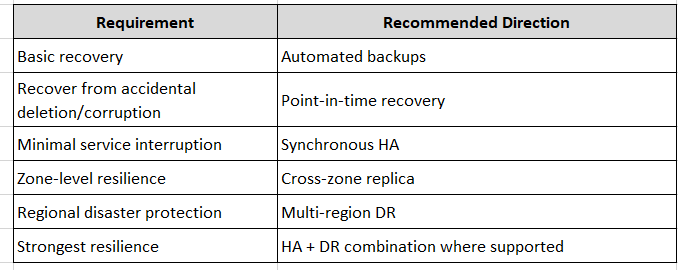
The correct architecture depends on business requirements, not simply on the highest available technical option.
9.22 Backup vs Replica
This distinction is extremely important.
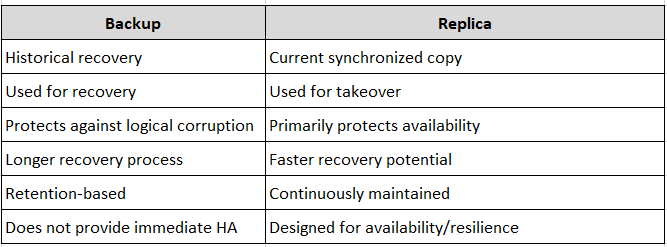
⚠ Key Point
A replica can replicate a corrupted change. A historical backup can provide a recovery point before that corruption occurred.
Therefore, backup and replication are complementary controls.
9.23 Production HA/DR Checklist
Before going live, verify:
Backup
- Automated backup enabled
- Retention meets policy
- Recent successful backup verified
- Recovery procedure documented
- Recovery responsibilities assigned
High Availability
- HA requirement documented
- Replica configured where required
- Availability zones reviewed
- Takeover behavior understood
- Application connectivity tested
Disaster Recovery
- DR requirement documented
- Regional failure scenario analyzed
- RPO defined
- RTO defined
- DR failover procedure documented
- DR test scheduled
9.24 Common Mistakes
⚠ Mistake 1 — Treating backups as HA
Backups help recover data but don’t provide the same recovery speed as a synchronized replica.
⚠ Mistake 2 — Choosing retention without business requirements
A 14-day retention period may be insufficient for regulatory or operational requirements.
⚠ Mistake 3 — Ignoring availability-zone placement
Zone selection can influence resilience, latency, and recovery options.
⚠ Mistake 4 — Never testing recovery
A backup that has never been tested should not be considered a fully validated recovery strategy.
⚠ Mistake 5 — Confusing RPO and RTO
Remember:
RPO = How much data can we lose?

RTO = How long can the service be unavailable?
9.25 Recommended Operational Procedure
For a production SAP HANA Cloud environment:
1. Define RPO/RTO
        ↓
2. Configure Backup Retention
        ↓
3. Select Availability Strategy
        ↓
4. Configure HA / DR
        ↓
5. Monitor Backup & Replication
        ↓
6. Document Recovery Procedures
        ↓
7. Perform Recovery Tests
        ↓
8. Review Architecture Periodically
9.26 Hands-On Exercise
Exercise 1 — Review Backup Configuration
Where
SAP HANA Cloud Central → Database Instance → Manage Configuration / Backups
Record:
- Current retention
- Latest backup
- Backup status
Exercise 2 — Verify Database Recovery Information
Execute:
SELECT
    DATABASE_NAME,
    VERSION,
    START_TIME
FROM SYS.M_DATABASE;
Record the current database version and startup time.
Exercise 3 — Review Replication
If your instance has replication configured:
SELECT *
FROM SYS.M_SERVICE_REPLICATION;
Review the replication status and log positions exposed by your current HANA Cloud revision.
Exercise 4 — Review Takeover History
If a takeover has occurred:
SELECT *
FROM SYS.M_SYSTEM_REPLICATION_TAKEOVER_HISTORY;
Analyze:
- Takeover start time
- Takeover end time
- Recovery position
- Duration
9.27 Knowledge Check
- What is the difference between RPO and RTO?
- What is the maximum documented RPO for SAP HANA Cloud backup recovery?
- How frequently are data backups created?
- Why are log backups important for point-in-time recovery?
- What is the difference between synchronous and asynchronous replication?
- When would you choose multi-region DR?
- Why is availability-zone placement important?
- Why can’t a backup be considered a replacement for HA?
- Where can a takeover be initiated?
- Why should recovery procedures be tested periodically?
Chapter Summary
SAP HANA Cloud provides a managed backup and recovery foundation, while optional replication capabilities allow organizations to build stronger HA and DR architectures.
The most important administration principle is to design from business recovery requirements first.
A production architecture should answer four questions clearly:
What can we lose?
       ↓
       RPO

How long can we be down?
       ↓
       RTO

How do we recover historical data?
       ↓
       Backup + PITR

How do we remain available during infrastructure failure?
       ↓
       HA / DR Replication
The administrator’s responsibility is not simply to enable backups or replicas. It is to ensure that the entire recovery strategy is configured, monitored, documented, and periodically tested.
Next Chapter
The next chapter will cover:
- SAP HANA Cloud SQL endpoints
- Public vs. private connectivity
- IP allow lists
- TLS-secured connections
- SAP HANA Cloud Connector
- Private Link / private connectivity options
- Network security architecture
- Restricting administrative access
- Troubleshooting connection failures
- Secure external access design
This will be particularly important for Basis consultants because network security is one of the areas where traditional on-premise HANA administration differs significantly from SAP HANA Cloud.
Follow me to catch the full series as it drops. Each article builds on the last.
#SAPAI #SAP #ArtificialIntelligence #MachineLearning #GenerativeAI #SAPConsultant #BusinessAI #Joule #SAPJoule #EnterpriseAI #S4HANA #SAPS4HANA #SuccessFactors #DigitalTransformation #SAPBTP #CAPM #SAPDeveloper #GenerativeAIHub #SAPAICore #MultiModel #GPT4 #Claude #Gemini #SAPBTPAI #ModelSelection #AIForBeginners #NoVendorLockIn #SAPCloud #CloudApplicationProgrammingModel #SAPTraining #SAPCareer #ABAP #SAPHANA #CloudComputing #EnterpriseApplications #TechSkills #CareerGrowth #Upskilling #JouleAgents #AgenticAI #SAPBuild #SAPIntegrationSuite #AutonomousEnterprise #FutureOfWork #BusinessTechnologyPlatform #SAPCommunity #Innovation #SAPSD #AIAgents #ERP #LearningInPublic #S4HANAPublicCloud #SAPPublicCloud #SAPLicensing #SAPCloudERP #CloudERP #BusinessTransformation #ITStrategy #EnterpriseArchitecture #SAPConsulting #SubscriptionModel #CloudMigration #TechnologyLeadership #CIO #EnterpriseTechnology #DigitalEnterprise #SAPLearning #SAPExperts #ERPTransformation #FutureOfERP #SAPCloudALM #ALMSummit2026 #SolutionManager #ApplicationLifecycleManagement #SAPAI #Joule #EnterpriseAI #S4HANA #AIAgents #SAPSecurity #BusinessAI #DigitalTransformation #SAPConsulting #Anthropic #SAP #SAPHANA #SAPHANACloud #SAPBTP #SAPBasis #CloudComputing #DatabaseAdministration #SAPTechnology #CloudArchitecture #DigitalTransformation